
Role
UX Designer
Tools
Figma, Kentico, Miro, Google Analytics, Microsoft Clarity
Timeline
May to August 2024 (4 months)
Status
Responsibilities
UX research, competitive analysis, data analysis, UX design, HTML/CSS implementation
Corporate One is heavily invested in getting credit unions onto the Real-Time Payments and FedNow networks. Instant payments are new, and credit unions tend to move carefully on new technology while still needing to stay competitive. The Real-Time Payments Info Center is where a credit union goes to learn how instant payments work, see what other credit unions are doing with them, and decide whether to start a conversation with us.
Marketing built the original version, but unfortunately, it wasn't getting much engagement, and so I was asked to redesign it. I put together a plan that started with research and moved into design, and I ran that by a group of stakeholders from across sales, marketing, and payments who owned the content and the business goals for immediate payments. Once they approved the plan, we met about every other week for the rest of the project so that I could share what the research was turning up and get their feedback on the designs as they came together. I ran the research, designed the new pages, and implemented them in Kentico myself.
The Info Center had been built as a place to put content rather than a place to find it, and that was clear in almost every part of the experience. If a member had a specific question or a specific format of educational material that they would like to find, they had little to no way to find it except to scan the entire page, hoping to find the thing they were looking for. This page had grown significantly since it was built, and there was too much content on the page for an average user to scan.
Some of these problems were visual, since the resource cards all carried the same weight and gave a member nothing to scan by, and some of them were structural, like the FAQs being one to a page with the links to the other FAQs buried at the bottom, so working through them meant going back and forth.
The bigger issue was that most of what our members needed was not present on the page. We had previously conducted interviews in 2024, and our credit union members had told us that they wanted to see specific types of content around specific topics before committing to instant payments, and very little of that had made it onto this page.


The original Info Center hero, featured content, and FAQ list.
What we already knew.
Before designing anything, I started by reviewing the existing research that we had. Our 2024 interviews with credit union employees produced findings that mattered here. People had strong and varied preferences for content format, such as reading materials, webinars, or infographics. Testimonials were repeatedly mentioned as an important thing for credit unions, because they typically look at what their peers do first and follow their lead. And many people were not convinced that they even had a use case for immediate payments at their credit union, or they had concerns about fraud that hadn't been answered yet.
What industry leaders were doing.
Our stakeholders named three resource centers that they thought worked well: FedNow, Alacriti, and Jack Henry. I compared all three against ours in a competitor analysis and considered several key factors. How easy is the resource center to find? How easy is it to locate webinars and reading materials? Do they have use cases, testimonials, fraud education? I combed through all four sites, including ours, and got a much better picture of where our competitors were meeting those needs in ways that we had not.

Alacriti's resource center, with filters by type and topic.
Scoring the page as it stood.
Next, I ran a PURE evaluation with my team on the existing pages, where we defined eleven tasks that a member might realistically take on the site. We broke each task down into steps and scored each step for difficulty. The page scored 77 on this first test, and Find Testimonials scored an 11, which was the worst task on the page even though testimonials were considered the strongest thing the members had asked for.
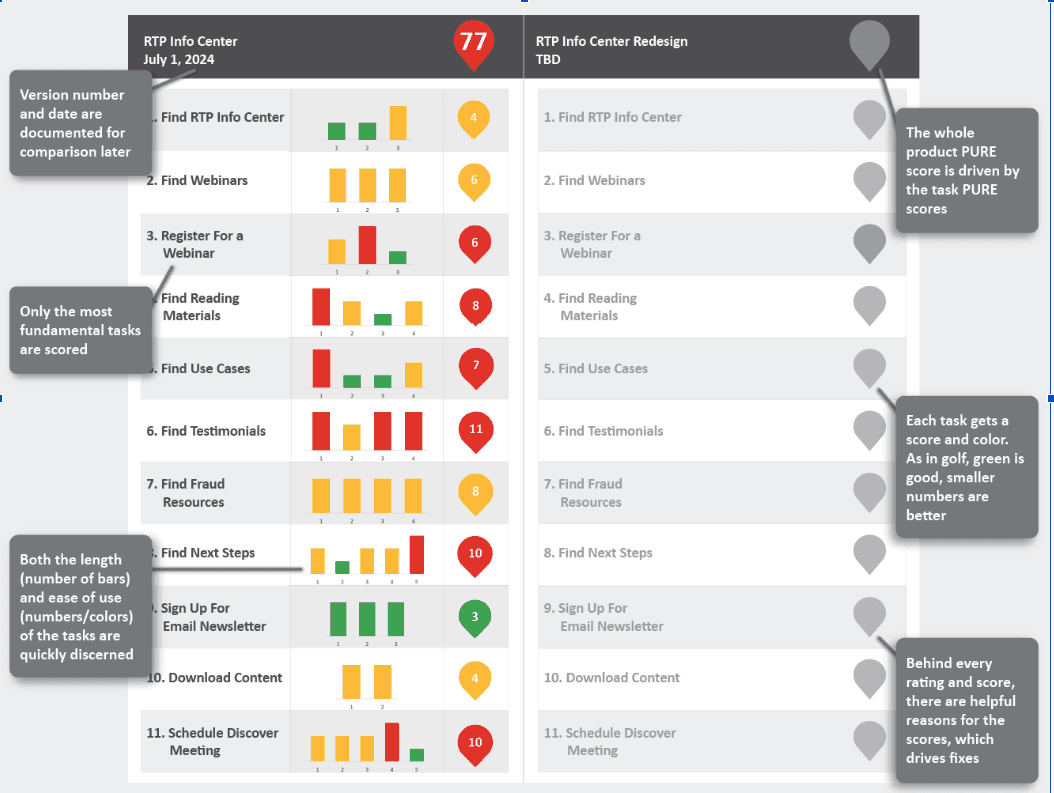
The July 2024 PURE scorecard.
What the behavior showed.
I went through Google Analytics and Microsoft Clarity heat maps to see how the page was actually being used, and one thing I hadn't expected was a circular graphic in the hero collecting a steady stream of clicks that went nowhere, which made sense once I looked at it, since it was round and styled like a button and was labeled with the exact word people had come to the page for.
All research and analysis pointed to the same gaps, which made the case a lot easier to argue when it came time to prioritize. We needed to completely redesign the page and focus on those aspects that were most important to our members.
I pulled all of this research into one document and summarized it into eight key opportunities supported by research.

Summary page from the UX opportunities document.
I was explicit in that document that these were the UX team's recommendations, and that the final prioritization belonged to the stakeholders who were weighing the business goals. We worked through the list together in one of our biweekly reviews and landed on three top priorities: Make specific content types easy to find, make topic-specific content easy to find, redesign the resource cards to be scannable.
One constraint shaped every decision, though. There were no development resources available to us at the time, and whatever we decided to change had to be achievable within the rich-text widget and inline CSS in Kentico. That eliminated our ability to make significant changes to the user experience, such as a filtering system or a site search. This was a major constraint that we had to keep in mind while working on a new design.
Making content types easy to find.
With what we had available, we were able to implement a tab structure within the resources navigation that allowed members to sort the resources by format, so they can find the type of content they prefer with one click. It wasn't the filtering system we would have chosen, and it still got members to the format they preferred without making them read through the whole page.

Content-type tabs on the redesigned Info Center.
Making topic-specific content easy to find.
This was a priority I could unfortunately only partially solve. The answer we needed was to be able to tag resources by topic so that a member could find everything about fraud, or use cases, or whatever they were looking for regardless of format. But tags needed development that we didn't have, so all we could do was give the single most requested topic its own place. We created a Success Stories tab that held case studies, attributed testimonials, and a list of credit unions that are already on the network with us.


The Success Stories tab, with the testimonial carousel and credit union logo wall.
Making the FAQs easier to move through.
What I originally recommended was putting all of the FAQs on one page as collapsible sections, since that's a pattern most people already know and it would have let a member work through several questions without leaving. Our digital marketing AVP had a strong SEO case for keeping each FAQ on its own page and wasn't going to move on it, and he was right about what that was worth to the business, so instead I redesigned the FAQ template so that the answer sits on the right and the full list of other questions sits on the left on every page. Each page still indexes on its own, and a member reading through them doesn't have to keep going back to the Info Center to find the next one.


The redesigned FAQ template: Before and After.
Making the resource list scannable.
I redesigned the card with a clear hierarchy, readable font, a thumbnail image, a content type, and an obvious call to action.

Original resource card and redesigned resource card before and after.
Beyond that, a handful of smaller changes came out of the research, like placing the newsletter signup more clearly at the top, adding download buttons for infographics, adding related content onto the article pages on the side rather than the bottom, and updating the hero banner so that the graphic people were already clicking on actually took them somewhere, which did bring those dead clicks down.
The redesigned Info Center launched in August 2024. In October, we re-ran the PURE evaluation against the same eleven tasks, and the score went from 77 to 55.
77 → 55
PURE score
8
research-backed opportunities
11
tasks re-benchmarked

July 2024 and October 2024 PURE scorecards.
Notably, the tasks that moved were the ones we were able to design against. Find Testimonials went from 11 to 6, Find Reading Materials went from 8 to 4, Schedule a Discovery Meeting went from 10 to 6, and Find Webinars went from 6 to 3.
Two tasks didn't move at all. Find Use Cases stayed at 7 and Register for a Webinar stayed at 6. Both of these were blocked by the same constraint, that the fixes required development that we didn't have.
I implemented the entire design in Kentico myself, as one of the few people at the company outside of the development team working in HTML and CSS.
Choosing the benchmark before launch was the right call.
The PURE evaluation gave us eleven defined tasks scored the same way before and after, so when the score moved from 77 to 55 we could say which tasks moved and why. Find Testimonials went from 11 to 6, Find Reading Materials from 8 to 4, Find Webinars from 6 to 3. The two that didn't move, Find Use Cases and Register for a Webinar, were both blocked by development we didn't have, and that showed up in the score as plainly as the successes did.
The analytics couldn't tell me whether it worked.
Comparing May 2024 to May 2025, users were up 85.7% and sessions up 24%, but paid traffic roughly tripled over that year, from one source to three, and every one of those sources averaged a session time of zero seconds. Google organic held steady at 26 users in both months. Engagement rate did go from 43% to 49% while paid traffic tripled, which would normally pull it down, and that's the one number I'd point to. None of it is clean enough to credit the redesign. I'd set it up differently now: define the measure before launch, separate paid from organic from the start, and pick something a marketing calendar I don't control can't distort.
We could watch the behavior, not ask about it.
Microsoft Clarity is still running on the redesigned pages, so I can see how members move through them the same way I saw the dead clicks on the old hero, and the heat maps and session recordings do tell me whether people are finding things. What they can't tell me is why, or whether the page gave someone what they came for. That takes talking to a member, and we didn't have the resources to set that up after launch. PURE got us a defensible score, but the people scoring it already knew where everything was. On a project like this again I'd still push to test with real members after implementation, even a handful of short qualitative sessions, because behavioral data and a member's own account of the experience answer different questions and I only had one of them.
The research outlived the constraints.
The tagging I designed in 2024 couldn't be built at the time. The good news is that it's being built as part of the Public Website Consistency project, as a widget that filters and searches resources and shows topic tags on the cards. The resource card is also becoming a reusable component in the same library. Despite the constraints when we completed this redesign, we were able to retain the research and use it once resources became available.
Want to talk through this project?
I’m happy to share more about the research process, design constraints, and what I learned from rebuilding a live resource hub without development support.
© 2026 Michelle Magruder · Real-Time Payments Info Center