

Role
UX Design Lead
Tools
Adobe XD, Figma, UserZoom Go
Timeline
June to September 2023 (4 months)
Status
Launched September 2023, in production since
Responsibilities
UX research, usability testing, UX design, design QA
Members Only is the portal that hundreds of credit unions log into to do business with Corporate One. From there they get to the applications they need, mostly payments, money management, and investment management, and the site also holds news, announcements, and support articles. The system had been designed in the nineties, and it was the first thing that people saw when they logged in.
The project had been sitting on the roadmap for years before it moved. Initial research and low-fidelity wireframes were created in 2019, and high-fidelity concepts were built intermittently in Adobe XD after that, but there was never development support to build any of it. In 2023 the company was finally able to take it on, and it was passed to me as the UX design lead. I picked it up in June, and it launched that September.
When the user first logs in, they encounter a system that was built in the nineties. This immediately gave our users the feeling that they were using an outdated system even if they didn’t realize it, and it did not hold up to our claims that we were an innovative and modern corporate credit union.
The bigger issue was what members were doing in it, which was logging in, finding the application they needed, and leaving. That was partly the point of the system, and there’s nothing wrong with a member getting where they’re going quickly. But Members Only also held news, announcements, and support articles that our members needed, and the earlier research had found that members thought of Members Only as applications and weren’t aware of anything else in it.
The research also told us that members were frustrated when they couldn't self-service and had to call us to fix something, that they learned the system by shadowing coworkers and through trial and error, and that they were often wearing many hats and acting as backup for several roles at their credit union. Occasional users struggled to find what they were looking for if they weren't already adept at navigating the system.
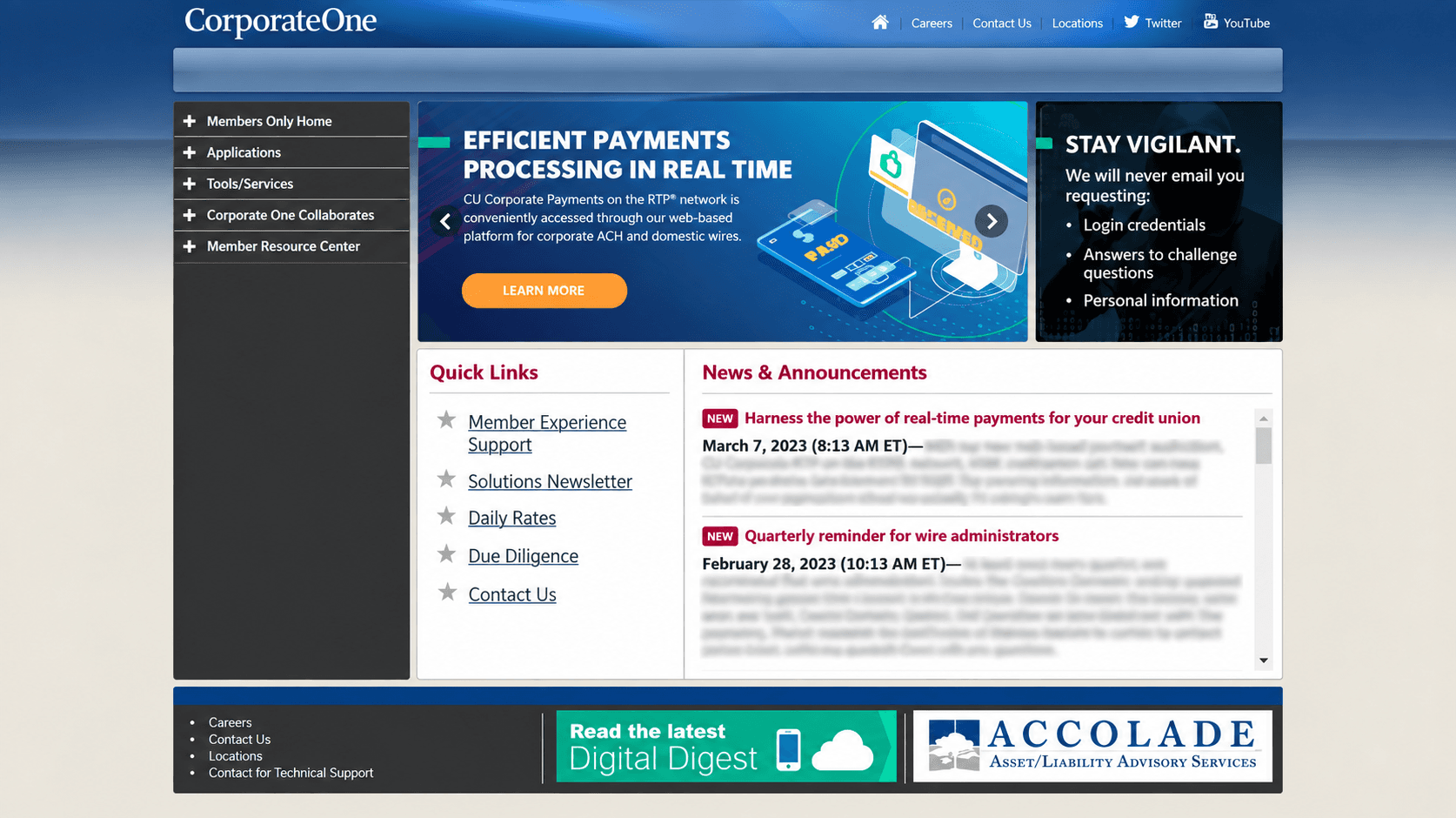
The original Members Only home page.
I was handed several years of work: user interviews and usability testing on the original system, empathy maps, personas and experience visions, user analytics dashboards, and both low- and high-fidelity mockups. My first job was going through all of it and deciding what still applied.
Most of it did. The system hadn’t changed, members were still using it the same way, and the findings about how people moved through it were as true in 2023 as they had been in 2019. What needed work was the design itself, since the feasibility had never been confirmed by developers and the requirements had shifted in the years since.

Empathy maps, user interviews, user analytics, and personas from the 2019 research.
The project kicked off in June 2023 with weekly meetings across UX, Product, Development, and Marketing to gather requirements, plus daily standups, and I refined the inherited mockups against what came out of those. Some of that was technical feasibility, and some of it was requirements that had changed or hadn't been settled yet.
Designing the authentication step before we knew what it would be.
Grid cards were finally being retired, and the inherited mockup handled what came next in general terms, offering email verification or security questions, because no decision had been made about what would replace them. Once we settled on the Entrust app, the screen had to change, since members were now being asked to pick up a separate device or open an app on their phone to get a code. The redesigned screen says which device to check, shows the three form factors a member might have so they can find theirs quickly, and includes the serial number so they can confirm they're looking at the right token.

The authentication screen before and after the Entrust decision.
Getting the applications off the home page.
The central design decision came out of the tension between the two things the system had to do. Members needed to reach their applications fast, and the business needed news and announcements to actually be seen. On the original home page the applications took up most of what a member saw, sitting in the middle of the page as a grid of icons with the news buried below it. Putting the applications behind a waffle menu in the header removed that whole section, and it kept them reachable in two clicks from anywhere in the system. That freed the home page to lead with news and announcements, without slowing down the thing most members were there to do.

The applications grid was removed from the home page to make room for news and announcements.
By July the mockups were approved and we were ready to test with real members. Development was already underway at that point, so the bones of the redesign were being built while we tested. What we were looking for were tweaks and confirmation that things worked the way we expected, not changes that would have meant reworking the design.
The prototype was a problem, though, since the high-fidelity screens were built in Adobe XD and I was working in Figma. Rebuilding all of it would have cost more time than we had before sessions started, so I brought the screens in as screenshots and wired them up in Figma with invisible elements over the interactive areas. It isn't how I would want to build a prototype, and it held up well enough that members could work through the tasks without the seams showing.
We recruited ten real members who used the system, and my team and I ran the sessions remotely over UserZoom Go, trading off moderating and taking notes.

Remote usability sessions in UserZoom Go.
Partway through the first few sessions it was clear that members were failing the same tasks in the same places, and I suggested we stop at five, make changes, and run the remaining five against the revised design. The team was concerned about whether I could turn the mockups around fast enough to keep the schedule. I was confident I could, and we ran it that way, which meant the second half of the study told us whether the fixes worked instead of confirming a problem we already knew about.
The login screen.
People were scanning past the option to manage their account and taking too long to find it. Cutting the wording down to "Register or manage account" was a small change, and members found it without trouble afterward.

The login screen before and after the first round of testing.
The waffle menu.
The menu held nine internal applications and two external ones, and the external links were treated as text links with an external-link icon at the bottom. The reasoning was sound, since those systems genuinely are separate and don't use single sign-on, and we wanted that distinction to be clear. But when we asked members to find the link to the Vault, they couldn't. Giving those two links the same visual treatment as everything else in the menu solved it immediately. The distinction we were protecting mattered to us internally and wasn't something members needed at the moment they were looking for a link.

The waffle menu before and after the first round of testing.
In August we presented the findings and the iterations to the team, got the changes approved, and handed off the remaining updates to development.
2
clicks to reach any app
10
members tested
4
months to complete
The redesign launched in September 2023. I stayed involved through development and ran UX reviews against the mockups and the research as the build progressed, and we added a Give Feedback option in the system so we’d keep hearing from members after launch.
Members can reach any application in two clicks from anywhere in the system, and the home page now leads with the news and announcements that members previously didn't know were there.
The feedback we’ve gotten through the system has been consistent about the same few things:
“I like where the Apps button is located — makes it easy to access what you need. I also like the placing of the news items. More easily noticed.”
“Very clean looking design. Easy to navigate through the apps to find what you are looking for.”
“I really like how the Support tab and contents are setup. It is cleaner and I feel it is easier to find what is needed.”
The system shipped as an MVP, and it's been running on that design since, with the team's focus moving to the public website in the years after.

The original and redesigned Members Only home page.
Splitting the study in two was the right call.
Partway through the first few sessions it was clear that members were failing the same tasks in the same places. I proposed stopping at five, making changes, and running the remaining five against the revised design. The team was concerned about the schedule, because it meant turning the mockups around in a matter of days while development was already underway. I was confident I could do that, and running it this way meant the second half of the study told us whether the login wording and the waffle menu treatment had actually solved anything. Had I run all ten sessions against the original design, I would have finished with ten confirmations of the same two failures and no evidence that the fixes worked.
I went in without a current picture of how the system was being used.
The user analytics that came with the 2019 research were several years old by the time we started in 2023, and we never pulled a fresh quantitative baseline of the old system before we changed it. The usability testing and the feedback we've collected since launch have been useful, but all of it is qualitative. If I were starting this again, I would pull current analytics before touching the design, so that whatever we changed could be measured more effectively.
The prototype was a compromise.
The high-fidelity screens were built in Adobe XD and I was working in Figma, so rather than rebuild all of them before sessions started, I brought the screens in as screenshots and wired them up with invisible elements over the interactive areas. It held up well enough that members worked through the tasks without noticing the seams. The limitation is that members could only do what I had anticipated and wired up in advance. A working prototype would have let them go somewhere I hadn't planned for, and that is usually where the findings you weren't looking for come from.
The design has been under real use since 2023.
The system shipped as an MVP that September and has been running on this design ever since. We added a Give Feedback option at launch so we would keep hearing from members after the project ended, and what comes back has been consistent about the same few things: the apps button is where members expect it, the news is where they notice it, and the Support tab is easier to work through. That does not replace the baseline I wish I had taken, but it does tell me that the three decisions we made deliberately are the three things members bring up on their own.
Want to talk through this project?
I’m happy to share more about the research process, usability testing, and what I learned modernizing a portal hundreds of credit unions rely on.
© 2026 Michelle Magruder · Members Only Portal Redesign